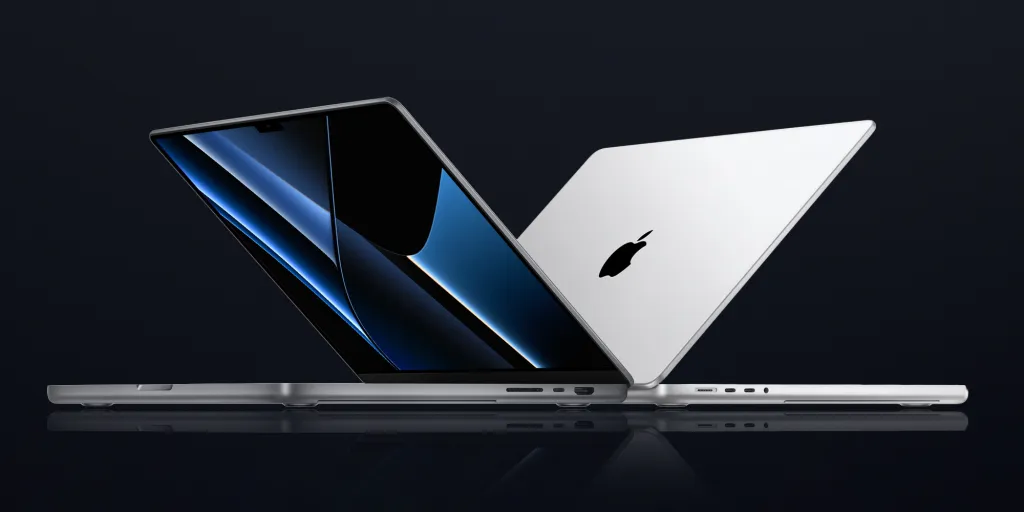
Rumors strongly suggest that Apple will be overhauling the MacBook Pro as soon as next year, marking five years since the previous redesign that we know and love today. There are five key rumors to follow with this redesigned MacBook Pro, and we’ll be delving into them here.
OLED display
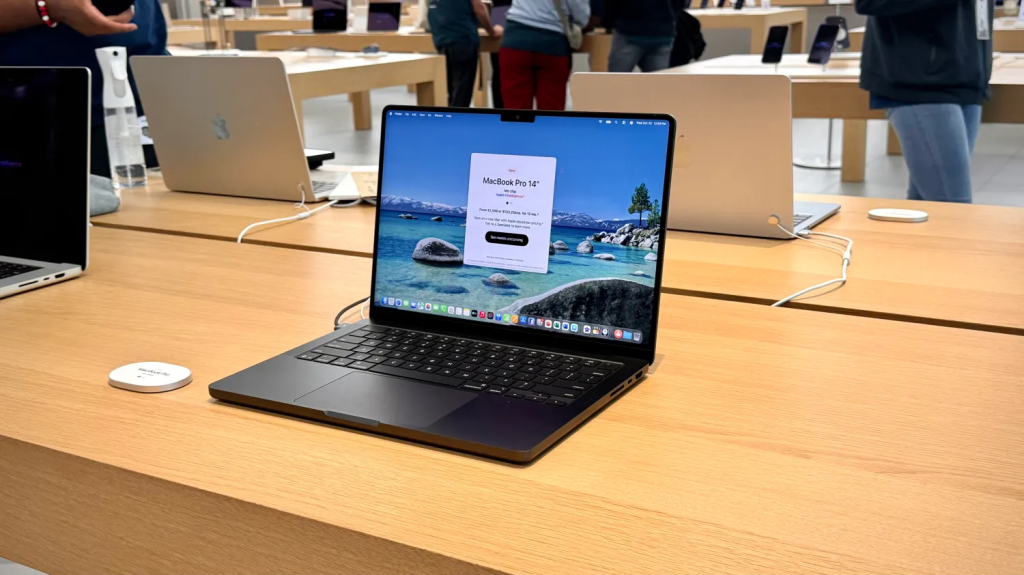
After debuting in the iPad Pro in 2024, Apple is expected to introduce OLED display technology to the MacBook Pro for the very first time with the redesign in 2026. This’ll provide higher brightness, better contrast ratios, and nicer colors to the MacBook Pro lineup for the very first time.
Plus, according to TheElec, Apple will be using the same Tandem OLED display tech as the aforementioned iPad Pro:
The OLED MacBook Air is also expected to get a standard single-stack display, rather than the more sophisticated Two-Stack Tandem displays we reported on for the MacBook Pro.
Single-stack displays have one red, green and blue layer, while two-stack tandem OLED has a second RGB layer. Two layers stacked in tandem increases the brightness of the screen, while also increasing longevity.
While transitioning to OLED, Apple may also ditch the notch, in favor of a smaller camera hole cutout. This information comes from Omdia, who describes it as a “rounded corner + hole cut.”
The report doesn’t specify whether or not it’ll be a single hole punch, or something more similar to Dynamic Island on the iPhone. Either way, there won’t be as chunky of a cutout in your MacBook Pro display once the redesign arrives.
Thinner design
According to Bloomberg, Apple will be adopting a new, thinner design with the 2026 MacBook Pro. There aren’t many other details specified, so it’s unclear if the overall chassis design will change:
Though Apple has continued to enhance the product with new chips and other internal improvements, the MacBook Pro probably won’t get another true overhaul until 2026. The company had once hoped to release this new version in 2025 — with a thinner design and a move to crisper OLED screens — but there were delays related to the display technology.
Touchscreen
Supply chain analyst Ming-Chi Kuo believes that we’ll see touchscreen Macs as soon as 2026.

There’s been an increasing amount of evidence that Apple is headed in this direction, and we’ll likely see this come to fruition as part of the 2026 MacBook Pro redesign.
Cellular support
Apple may also be shipping its first cellular Mac with this 2026 redesign. Late last year, Bloomberg’s Mark Gurman reported that the company was working towards building an in-house modem for Macs as early as 2026. This is part of Apple’s larger vision to build more and more of its components in-house.
Cutting-edge M6 chip
Apple will also debut the M6 family of chips in this new MacBook Pro redesign. Currently, M6 is anticipated to be the first generation of Apple Silicon to adopt TSMC’s 2nm technology, alongside the A20 chip for iPhone.
If you’re someone who buys the base model MacBook Pro, you may need to wait a little while for the redesign.
We’ll definitely see M6 Pro and M6 Max chips debut in this new MacBook Pro redesign, though rumors are conflicting about whether or not Apple will immediately release a base model 14-inch MacBook Pro with the M6 chip.
Last month, Bloomberg’s Mark Gurman reported that the redesign would be exclusive to M6 Pro and M6 Max models.
Release date
These new redesigned OLED MacBook Pros should debut sometime between late 2026 and early 2027. Rumors haven’t been super clear about that one, though if I were to guess, I’d say that we’ll potentially see an unveiling towards the end of 2026 (likely in October), though there’ll probably be limited supply until things ramp up early into 2027.
There would be precedent for this prediction, seeing as most analysts predicted that the M3 MacBook Pros wouldn’t launch until early 2024 based on how production was ramping. Then, out of nowhere, Apple announced there would be an October keynote – and said MacBooks did in fact launch in 2023, though it was hard to get certain configurations.
MacBook Pro vs. MacBook Air: Which Apple laptop you should buy, according to experts
Which should you buy: a MacBook Air or a MacBook Pro? It’s a surprisingly tough question since you can’t go wrong either way. Apple refreshes its lineup annually, equipping its devices with improved hardware and new software features. When purchasing a new Apple laptop, several key factors should be taken into consideration. So, where do you start?
You’ll need to first consider a MacBook’s computing power, storage capacity, display, and size. In terms of hardware, the MacBook Pro is the “better” computer. It’s more powerful, features a larger screen, and offers more storage, among other improvements.
Also: How to clear your Mac cache (and stop the occasional crashes for good)
In years past, there has been a big divide between the hardware in a MacBook Pro and a MacBook Air, but with the advent of the M4 MacBook Air, that distinction isn’t as clear-cut. The refreshed Air features Apple’s M4 chipset, providing the series with a significant power boost. It also comes with more memory for a better overall experience.
Combining all the size options, there are currently 10 MacBook Pro configurations and six MacBook Air configurations. Let’s review the main differences between the two to help you decide which one to purchase.

What’s the difference between the MacBook Pro and MacBook Air?
The MacBook Pro is available in two sizes: 14 inches and 16 inches, with the 14-inch model available in three primary configurations. There is one housing the new M5 chip, which launched recently in October 2025, one with the M4 Pro, and another housing the M4 Max. The 16-inch MacBook Pro is only available housing the latter two chipsets. Additionally, note that the base M4 MacBook Pro is no longer available for sale on Apple’s storefront. You’ll need to visit a third-party platform, such as Amazon, for the older model.
All three chips are high-performing, although there are notable differences among them. The M4 Max remains the best chipset out of the trio, boasting a powerful media engine capable of handling the most demanding tasks.
Review: Apple M5 MacBook Pro
Each chip has a different number of performance cores. The M5 has a 10-core CPU and a 10-core GPU. Apple’s M4 Pro houses a 14-core CPU and a 20-core GPU. The M4 Max features the same processor as the M4 Pro, but it sports a 32-core GPU instead. Apple’s M4 MacBook Pro models also have different amounts of unified memory, ranging from 16GB to 48GB

What makes the M5 MacBook Pro so great is that it strikes a perfect balance between power and cost. ZDNET Managing Reviews Editor Kerry Wan tested the model back when it first launched.
According to his benchmarks, the M5 MacBook Pro outperforms the M4 MacBook Pro significantly. In fact, it is comparable in performance to the M1 Ultra Mac Studio, a $4,000 computer from three years ago.
Its single-core processor scores were good too, indicating that the laptop is quite fast. And sure enough, that’s exactly what Wan experienced during his testing. He praised the hardware for gracefully handling dozens of tabs, ZDNET’s content management system, music apps, and Adobe Premiere Pro.
Other benefits of the M5 MacBook Pro include a long-lasting battery, a robust set of ports (including three Thunderbolt 4 ports and an SDXC card slot), and a vibrant Liquid Retina XDR display.
Also: Should you ever turn off Windows Security? It’s tricky, but here’s my rule of thumb
The M5 MacBook Pro is a solid laptop for most use cases, but if the base chip isn’t powerful enough for you, consider the M4 Pro and M4 Max laptops instead. Those chipsets are still more powerful, although the performance gap between the new base model and Pro models has shrunk.
- Prices for the 14-inch M4 Pro and M4 Max models start at $1,999 and $3,199, respectively.
- Prices for the 16-inch M4 Pro and M4 Max models start at $2,499 and $3,499, respectively.
Apple will one day release the M5 Pro and M5 Max versions of the MacBook Pro. The exact date is unknown, although it is likely to be sometime in early 2026. Not much is known about these laptops, but I wouldn’t be surprised if they both eclipse the M1 Ultra Mac Studio.

As for the MacBook Air, there are two models available: a 13-inch and a 15-inch M4 model, both listed on Apple’s website. The older M3 units are no longer officially on sale, but you can still find the M3 MacBook Air at Amazon.
This generation utilizes the powerful M4 chipset, and although it can’t reach the same heights of power as the MacBook Pro, it’s still no slouch.
ZDNET Editor Kyle Kucharski spent some quality time testing the M4 MacBook Air and praised the laptop’s responsive performance. Across multiple benchmark tests, the MacBook Air performed quite well, even coming close to the old M4 MacBook Pro, and in some instances, outdoing the M3 MacBook Pro.
Also: I’ve tested multiple laptops that cost less than $1,000
Battery life is excellent, too, lasting over 14 hours on a single charge. Its Liquid Retina display delivers a crisp image, well-defined text, smooth, vibrant video, and support for 1 billion colors. Other notable features include the ability to support two external monitors while the lid is open and Center Stage, which keeps you in the center of the MacBook’s webcam.
The MacBook Air model has significantly fewer ports than the MacBook Pro, consisting of only two Thunderbolt 4 inputs, a headphone jack, and a MagSafe 3 charging port. Due to its lightweight design, the laptop weighs only 2.7 pounds. Conversely, the Pro laptop weighs 3.4 pounds and can become heavier when equipped with a more powerful chipset.
Review: Apple M4 MacBook Air
Multiple MacBook Air configurations are available. At $999, the cheapest model has a 10-core CPU, an 8-core GPU, 16GB of unified memory, and 256GB SSD storage. The high-end model, priced at $1,399, features the same processor but sports a 10-core GPU, 24GB of unified memory, and a 512GB SSD.
You can upgrade certain aspects, like increasing the storage space to 1TB. Doing so will increase the price by $400, so be mindful of your shopping budget. If you want to save money, the base M3 MacBook Air is available on Best Buy for $900.

Which MacBook is right for you?
The answer mainly depends on how you see yourself using the laptops and how the display size and weight factor into that equation. A reliable computer is an investment; you don’t want to spend too much on an overqualified laptop, and you don’t want to buy a computer that’s not powerful enough for your needs. Since the gulf between the two models isn’t as big as in previous generations, the one you should buy depends on the type of user you are.

If you’re a graphic designer, music producer, professional photographer, videographer, 3D artist, or iOS game and app developer, a MacBook Pro would be the way to go. The Pro models can handle intense graphics processing and multiple software applications running in the background without significant lag, overheating, or any other performance problems. Apple’s M5 MacBook Pro is fine for most use cases; however, if you’re looking to upgrade today, I recommend paying extra for the M4 Pro chip.
Also: 9 essential Mac apps I can’t live without – and why
If you are a student or someone who spends most of your time in Microsoft Office or Google Workspace, a MacBook Air will be a better fit, as it won’t put a burden on your wallet. It’s perfect for people who just want to casually surf the internet, watch YouTube or Netflix, respond to emails, and FaceTime their friends.
Regardless of which one you pick, both deliver the hallmark Apple experience: smooth performance, longevity, and effortless integration with the rest of the Apple ecosystem. You’ll be getting a machine built to last and designed to make your daily workflow a whole lot easier.
The best holiday discounts for Apple products:
- Apple Watch Ultra 2 – $549 ($250 off!)
- AirPods Pro 3 – $199 ($50 off)
- M4 MacBook Air – $749 ($250 off!)
- iPad Air 11″ – $449 ($150 off)
- M4 Mac mini – $479 ($120 off!)
- Apple Watch SE 3 – $199 ($50 off)
Note: This article is based on leaks, industry rumors, and analyst reports available at the time of writing. Apple has not officially confirmed any of the features, specifications, or launch timelines mentioned above. Final product details may vary once Apple makes an official announcement.
#MacBookPro #AppleRumors #AppleSilicon #TechNews #UpcomingTech #LaptopUpgrade #AppleLeaks #MacBookUpdate #ProLaptops #FutureTech#Carrerbook#Anslation.